CAN Bus and DBC files
Listen to everything your vehicle broadcasts (gear, brakes, switches) by loading a DBC file.
OBD2 gives you the standard values every vehicle must answer. But your vehicle's electronics are constantly broadcasting much more on the CAN bus: gear position, brake pressure, switch states, ABS data, manufacturer-specific sensors. Kivo can listen to all of it. To make sense of it, it needs a DBC file.
What's a DBC file?
A DBC is a dictionary for CAN traffic. It says, for example, "message 0x1A0 carries wheel speed in bits 16–31; multiply the raw value by 0.01." DBC files come from manufacturer documentation, community reverse-engineering projects for your model, or your own sniffing with tools such as SavvyCAN. Kivo reads the standard .dbc format they all use.
Loading one
- On the home screen, tap CAN Bus.
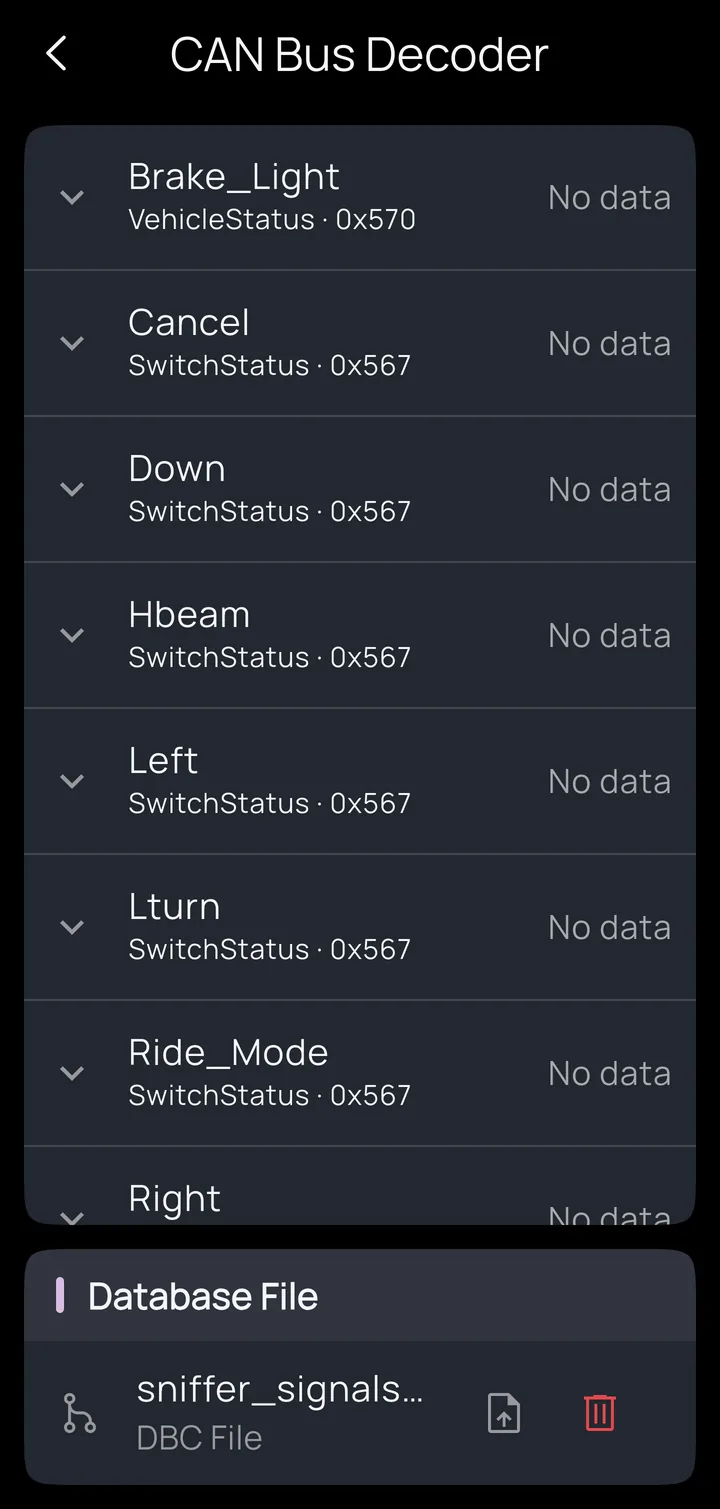
- In the Database File card, tap the upload button and choose your
.dbcfile. It's copied into the app, so you can delete the original. - The screen fills with every signal the file defines. Tap a signal to see its details (message ID, bit layout, scaling, value labels). Live values appear beside each signal as they arrive.
DBC files belong to a profile: your bike's DBC stays with your bike's profile.
Two ways to listen
- A Kivo Core in CAN / OBD2 mode, wired to the bus. The controller decodes signals on the vehicle and streams them to the app. It listens passively and never transmits in normal use, so it can't disturb the vehicle's electronics. Bus speed (500 or 250 kbit/s) is detected automatically.
- An STN-chip OBD2 adapter set to CAN Bus data mode in its device details. The adapter streams raw bus traffic and the phone decodes it. Only some adapters can do this; see supported adapters.
Using the signals
Decoded signals work like OBD2 values everywhere in the app: put them on dashboard gauges, alarm on a threshold ("coolant above 105 → say engine hot"), or trigger actions ("brake active → lights to full"). Unlike OBD2 polling, broadcast signals arrive as fast as the vehicle sends them: up to 20 updates a second per signal through the Kivo Core.
Limits worth knowing
- The Kivo Core watches up to 32 signals (and 32 on-device triggers) at a time. The app subscribes to the ones your alarms, actions and dashboards use.
- Signals with standard 11-bit message IDs are supported. 29-bit (extended ID) signals aren't decoded yet.
- A malformed DBC file loads as "no signals found" rather than showing errors. If you expected signals and see none, check the file in a DBC editor.
- Signal names must be unique. If two messages define the same name, the first one in the file wins.